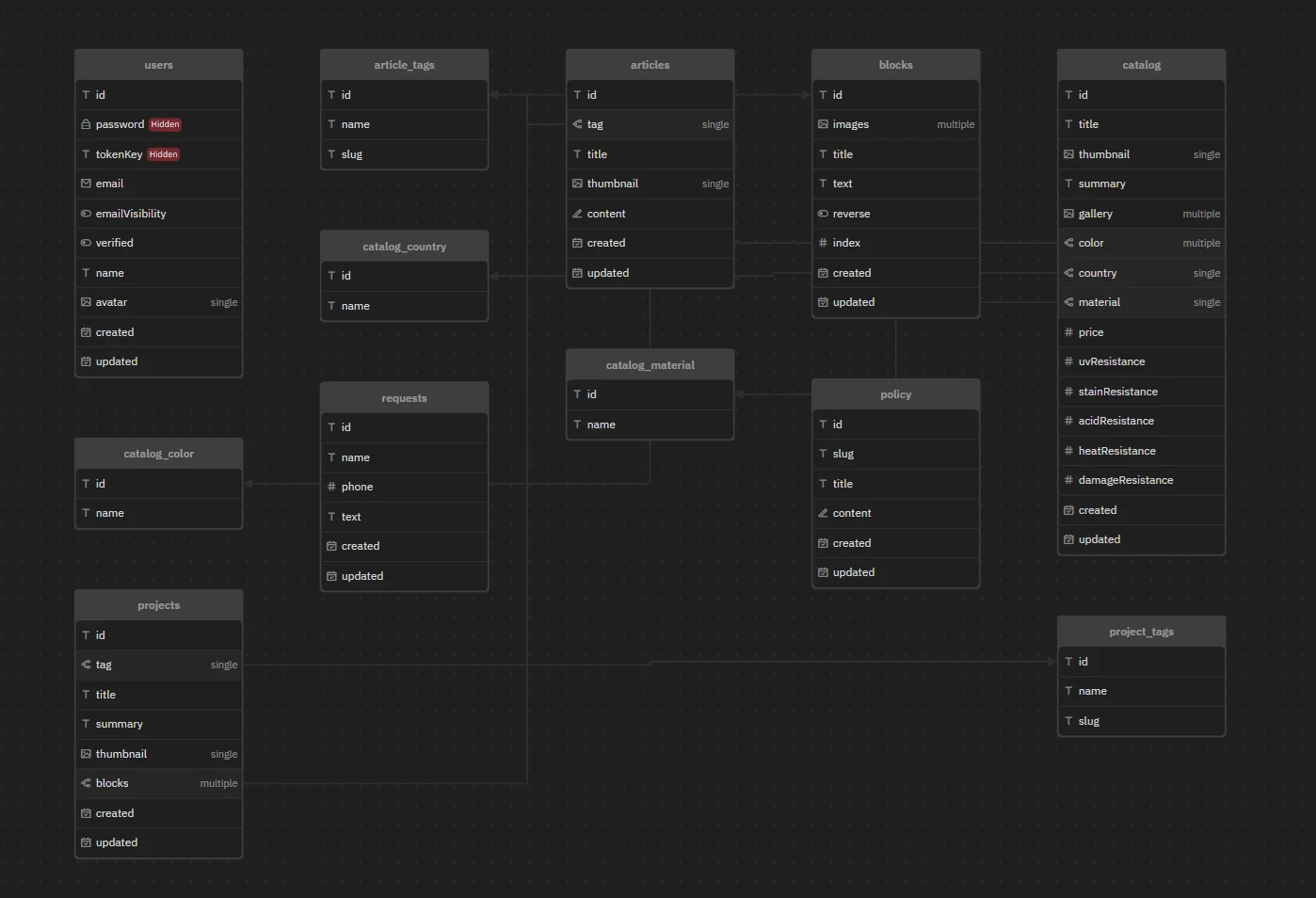
Feature set
- Complex animations and transitions
- News, project, and catalog feeds
- Advanced filters
- Dynamic content blocks: 9 visual variations for one data structure
- Similar product recommendation system
- Parsing user-generated HTML
Stack
Frontend:  Next.js, TypeScript, Zustand, Tailwind CSS, Motion (Framer), Base UI, htmr, React-hook-form
Backend:   PocketBase
Design:    Figma
Toolchain: GitHub, Docker
Cleaning user-generated HTML
HTML from the rich-text editor in PocketBase is of questionable quality.
Mostly it’s endless nesting of <p> tags, which is non-obvious for an inexperienced user.
Because of this, problems arise with styling the rendered content.
One of the cleanup steps is deduplication of nested <p> tags:
import { sanitize, addHook } from "isomorphic-dompurify";

addHook("afterSanitizeAttributes", (node) => {
  if (node.nodeType !== 1 || node.tagName !== "P") return;

  const parent = node.parentNode;
  if (!parent) return;

  let hasElementChild = false;
  let hasNonEmptyText = false;

  for (const child of node.childNodes) {
    if (
      child.nodeType === 1 &&
      !PHRASING_TAGS.has(child.nodeName.toLowerCase())
    ) {
      hasElementChild = true;

      break;
    }

    if (child.nodeType === 3) {
      if (child.textContent && child.textContent.trim() !== "") {
        hasNonEmptyText = true;
      }
    }
  }

  if (hasElementChild) {
    while (node.firstChild) {
      parent.insertBefore(node.firstChild, node);
    }

    parent.removeChild(node);
    return;
  }

  if (!hasElementChild && !hasNonEmptyText) {
    parent.removeChild(node);
  }
});
Initializing the project feed store
All list components have roughly the same zustand store structure.
The difference for the project list page is an optional query parameter filter by category.
On service pages there are links to the project page of the relevant category, so the first mount may assume a filter is present.
async function init(type: string) {
  const { projects } = get();

  if (projects.length) {
    return;
  }

  if (type !== "") {
    const tags = await getTags({ isClient: true, type: "project" });
    const tagsRecord: Record<string, Omit<Tag, "id">> = {};
    let filter = "";

    tags.forEach((tag) => {
      tagsRecord[tag.id] = { name: tag.name, slug: tag.slug };
      if (tag.slug === type) {
        filter = `tag?~"${tag.id}"`;
      }
    });

    set({ tags: tagsRecord, filter });

    const { items, page, totalPages, totalItems } = await getProjects({
      page: 1,
      perPage: PER_PAGE,
      filter,
      isClient: true,
    });

    set({ projects: items, page, totalPages, totalItems });
    return;
  }

  const [tags, { items, page, totalPages, totalItems }] = await Promise.all([
    getTags({ isClient: true, type: "project" }),
    getProjects({ page: 1, perPage: PER_PAGE, isClient: true }),
  ]);
  const tagsRecord: Record<string, Omit<Tag, "id">> = {};

  tags.forEach((tag) => {
    tagsRecord[tag.id] = { name: tag.name, slug: tag.slug };
  });

  set({ tags: tagsRecord, projects: items, page, totalPages, totalItems });
}
Filters
List of filters by category
- mid-level list component with stable selectors.
- root-level list component uses a
loading flagto avoid a race condition. isOverlayis a stable prop;memoprevents an extra re-render of the list.
const PropertyFilters = React.memo(
  ({ isOverlay = false }: { isOverlay?: boolean }) => {
    const filters = useCatalogStore((s) => s.filters);
    const toggleFilter = useCatalogStore((s) => s.toggleFilter);

    return (
      <div
        style={{
          gridTemplateRows: isOverlay
            ? undefined
            : `repeat(${Object.keys(filters).length}, 1fr)`,
        }}
        className={clsx(
          "gap-8 lg:gap-10",
          isOverlay ? "flex flex-col" : "grid flex-1 min-h-0",
        )}
      >
        {Object.entries(filters).map(([key, fs]) => (
          <div className="flex flex-col gap-2 min-h-0" key={key}>
            <h4 className="font-bold text-2xl select-none">
              {filterCategory[key as keyof typeof filterCategory] || key}
            </h4>
            {/* ... */}
            <ScrollArea.Root className="h-full min-h-0">
              <ScrollArea.Viewport className="h-full">
                <ScrollArea.Content className="flex flex-col gap-2">
                  {Object.entries(fs).map(([id, filter]) => (
                    <PropertyFilterEntry
                      key={id}
                      id={id}
                      name={filter.name}
                      category={key}
                      toggleFilter={toggleFilter}
                    />
                  ))}
                </ScrollArea.Content>
              </ScrollArea.Viewport>
              <ScrollArea.Scrollbar className="... pointer-events-none data-hovering:pointer-events-auto data-scrolling:duration-0 data-scrolling:pointer-events-auto">
                <ScrollArea.Thumb className="w-full bg-black/50" />
              </ScrollArea.Scrollbar>
            </ScrollArea.Root>
            {/* ... */}
          </div>
        ))}
      </div>
    );
  },
);
Filter item
bottom-level component in the chain.
Receives ~static data from the parent component and a stable pointer to the update function.
The granular active-state selector is isolated at the item level.
Stable selectors remain in the parent component — as a result, the item doesn’t need memo.
Optimal data-flow for the expected number of filters: subscribing to the store for each item is cheaper than the reconciliation loop and shallow-comp.
The number of items at which this approach becomes harmful already assumes the use of a virtual-list — not justified for the current scope.
interface PropertyEntryProps extends Filter {
  category: string;
  toggleFilter: (id: string, category: string) => Promise<void>;
}

const PropertyFilterEntry: React.FC<PropertyEntryProps> = ({
  id,
  name,
  category,
  toggleFilter,
}) => {
  const isActive = useCatalogStore((s) => s.activeFilters[category].has(id));

  return (
    <button
      onClick={() => toggleFilter(id, category)}
      className="flex items-center gap-3 ..."
    >
      <span
        style={{ borderWidth: "1.5px" }}
        className={clsx(
          "relative size-5 border flex items-center justify-center",
          {
            "bg-black": isActive,
          },
        )}
      >
        <CheckIcon className="absolute size-5 fill-white" />
      </span>
      {name}
    </button>
  );
};
Mount animations of list cards
An orchestrated mount animation is defined for list elements.
The handler attaches to the local root layout of the list page.
When navigating between root and child pages, the animation doesn’t play and doesn’t worsen UX.
When going beyond the current root page, the state flag updates, and the animation plays again on subsequent visits.
export const AnimationHandler = () => {
  const current = usePathname();
  const prev = React.useRef(current);
  const toggleAnimate = useCatalogStore((s) => s.toggleAnimate);
  const reset = useCatalogStore((s) => s.reset);

  React.useEffect(() => {
    if (current && current !== prev.current) {
      toggleAnimate(false);
    }
  }, [current]);

  React.useEffect(() => {
    return () => reset();
  }, []);

  return null;
};